CSS Notes PDF โ€” Free Download (161 Slides)

Master cascading sheets, specificity algorithms, margins alignments, Flexbox grids, responsive queries, and custom keyframes transitions.

๐Ÿ“บ Thapa Technical YouTube series
๐Ÿ†“ Free download

Also available: PPTX slides (6.9 MB) ยท course source code on GitHub

๐Ÿš€ LEARNING ROADMAP

Complete Learning Path

Follow this structured flow to learn and download resources as you build.

1. Starter Code
Begin the tutorial with clean templates and asset resources.
2. Final Code
Compare your live designs with completed source code.
3. PDF Notes
Consolidate layouts guides with illustrated PDF cheat sheets.
4. Full PDF
Unlock and download the complete study bundle.

More Course Notes Guides

Swipe to see all →
๐Ÿ’ป GITHUB INTEGRATION

Interactive GitHub Repository

Explore the directory layout of the course materials and download specific parts.

๐Ÿฑ thapatechnical/css_couyrse_by_thapatechnical โญ Star Repo
  • โ–ผ ๐Ÿ“‚ css-course
    • โ–ผ ๐Ÿ“‚ CSS_stater_file_thapaTechnical
      • ๐Ÿ“„ index.html (starter outline)
      • ๐Ÿ“„ style.css (empty styles setup)
      • ๐Ÿ“‚ images
    • โ–ผ ๐Ÿ“‚ CSS_complete_code
      • ๐Ÿ“„ index.html (completed layout)
      • ๐Ÿ“„ style.css (final styled sheets)
      • ๐Ÿ“‚ assets
    • ๐Ÿ“„ README.md

1. Download Starter CSS Files

Begin styling immediately with predefined structures and assets.

2. Download Complete css notes

Cross-verify your styled layouts with final complete code output.

3. Download the Notes (PDF or PPTX)

The same 161 slides as a PDF to read on any phone or laptop, or as an editable PowerPoint file.

What's inside the CSS notes

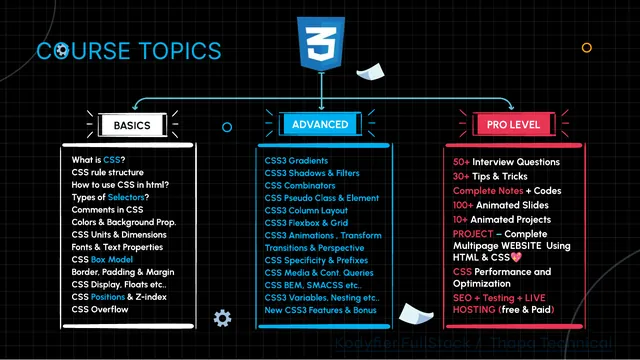
The 161-slide deck from the Thapa Technical CSS course, in the order the course teaches it, from the first selector to hosting a finished site.

  1. Client vs server, the building blocks of a website and what CSS is Slides 5โ€“12
  2. How to write CSS, its history, rule structure and three ways to add CSS Slides 13โ€“21
  3. Selectors: element, class, ID and pseudo-class, plus comments Slides 22โ€“30
  4. Colors, RGB and backgrounds Slides 31โ€“37
  5. Units, fonts, text properties and text-shadow Slides 38โ€“44
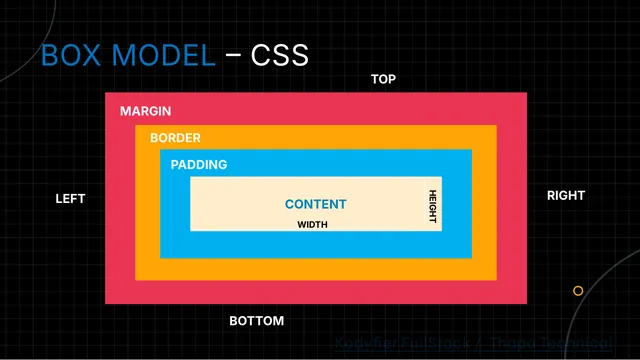
  6. The box model: border, padding and margin Slides 45โ€“53
  7. Gradients: linear, radial, angles and shapes Slides 54โ€“60
  8. box-shadow, drop-shadow and filters Slides 61โ€“66
  9. Lists, anchor states and combinators Slides 67โ€“72
  10. Display, positions and z-index Slides 73โ€“84
  11. Overflow, pseudo-elements and pseudo-classes Slides 85โ€“90
  12. Column layout Slides 91โ€“92
  13. Flexbox Slides 93โ€“107
  14. Grid Slides 108
  15. Transitions, transforms and animations Slides 109โ€“114
  16. CSS variables and specificity Slides 115โ€“123
  17. New CSS features, bonus tips and clip-path Slides 124โ€“129
  18. Mini projects: centering a div, positions and Flexbox practice Slides 130โ€“143
  19. Container queries Slides 144
  20. CSS architecture: vendor prefixes, browser compatibility, BEM and SMACSS Slides 145โ€“152
  21. Final projects, SEO, testing and performance Slides 153โ€“158
  22. Hosting your website live Slides 159โ€“160

Preview: slides from the CSS notes

Course topics slide listing the CSS topics in the notes
Slide 3
CSS box model slide showing margin, border, padding and content
Slide 45
Flexbox in CSS slide
Slide 93

Why learn from Thapa Technical?

Vinod Thapa runs the Thapa Technical YouTube channel (750K+ subscribers). Known for simplifying complex programming concepts using visual schemas, real-life templates, and humor. These are the slides from his course, so you can revise along with the videos.

Want to learn CSS properly, with projects? Take the CSS Masterclass (recorded) or the HTML, CSS & JavaScript course (recorded).

Found this helpful? Share it with other students!

Your share helps keep this content free and accessible to learners everywhere.

๐Ÿ”’

Subscribe to Unlock Notes

To maintain this repository and keep quality coding notes free, please subscribe to Thapa Technical on YouTube.

10

Starting download...

Verification in progress. Do not close this screen.